
PowerShell 7.4 snuck in an interesting new feature for it’s web CMDlets, “Support HTTP persistent connections in Web Cmdlets”. This brings some very useful performance benefits that I’ll demonstrate with a quick test in this post.
What is this Change
I’ve had a number of scenarios where I’ve had to query an API without any sort of session-based authentication, but rather have to use explicit credentials. What has happened up until now is that when using Invoke-WebRequest or Invoke-RestMethod with the -Credential parameter, each individual call to the API will result in a new HTTPS session being created. This takes time, and often a lot of time compared to the total request time.
Now we can use the -SessionVariable parameter to output a session variable, and then use this to maintain connection persistence across subsequent requests.
A Real World Test
Consider this piece of code which queries a ServiceNow table for a piece of hardware (note that I have changed any environment specific details). We do 40 iterations for this test, and we take the second result set to account for any caching.
$ScriptBlock = {

    # Get a suitable credential for ServiceNow
    $Credential = Get-Credential

    # Initial request to create session variable
    $uri = "https://your-instance.service-now.com/api/now/table/alm_hardware/21195162eaba4638ba53e4489cd71c47"

    # Initial request to create web session
    $Session = Invoke-RestMethod -Uri $uri -Method Get -Credential $Credential -SessionVariable WebSession

    $x = 40

    for ($i = 0; $i -le $x; $i++) {

        # Requests using session rather than explicit credential
        $Device = Invoke-RestMethod -Uri $uri -Method Get -WebSession $WebSession
    }
}

$result = Measure-Command -Expression $ScriptBlock
return $result
The result for PowerShell 7.3:

The result for PowerShell 7.4
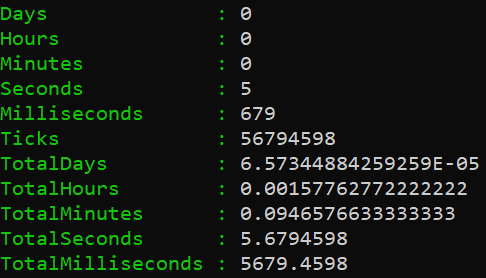
5.6 seconds versus 10.6 seconds is a significant difference, and we can conclude from that that the time spent creating HTTPS connections accounts for almost half of the time under PowerShell 7.3.
This will vary depending on which API you are working with. I ran some tests on the SCCM API and found there was about a 15% performance improvement, but this is because the query portion of the API call is taking a lot longer than the sample ServiceNow call in the test above.
Conclusion
I would stick to session based authentication where possible, however where you need to specify the -Credential parameter for whatever reason, PowerShell 7.4 can bring a very welcome performance improvement.
 .The Dot Source